This is my own little scene for the challenge of Infinte Journeys. I had a lot of fun. I mainly wanted to play with Blender genrators such as botanic to create the scenes. This was the reference I was based on. I add this work here as it feels more like a little sketch I put up in a few days more than an actual finished piece. Sometimes in a while its not about the final outcome, sometime is just the fun!
Irene Arnaiz Lopez
https://www.kendal316.com/

2D Game (Unreal Engine 4) developed for the Global Game Jam 2022
General / 31 January 2022
This year for the global game jam I wanted to challenge myself and be the programer of the team. I was allready getting to the end of my master degree in blueprints and I felt It was the perfect moment to challenge my self with some fast pace developing in 48 hours. I had a bit of an advantage I must say because what I did is, I went to newgrounds.com, played some minigames and looked at some good mechanics that I felt they could be east to tackle in 48 hours for someone of my level ( A total roockie I must say) In the team, the artist involved where 2D artist so the game had to be in 2D. It was a weird aproach regarding the fact that we where doing it with unreal but in the end it turned out to be quite easy to understand.
My role was only programing. The team was conformed of 5 people. Go fin there links here!
Katia Ulin : Artist https://linktr.ee/katiaulin
Lola Ramon : Artist and storyteller https://www.elmegafono.es/lola
Also including Jorge Briñas junior and senior. A dad and his kind who joined with uswoked as artist and music composer :D
THE GAME


The game is a simple transformer with two four types of diferent bullets you can shoot. One purple and pink and both have a kill or grab effect depending on which whan you would launch. The idea is that depending on what enemy you decide to catch first there would be a point bar filling up and substracting from the other color. The first color to reach the top limit wins and affects the ending of the level. That was the idea of the play.
The theme of th GGJ was duality so the story was about a cow who had to diferent feeling and had to fight against one or the other.
Some of the issues we encountered was regarding to colision and some AI problems but at the end it was quite funny how the game tuned out. Your can get a playable copy in the itch.io link.


My opinion would bi biased in this case because UE4 is the only game engine I know how to use ( for programing) but the experience working with 2D was quite good in factand pretty easy to understand.
New master course UNREAL ENGINE BLUEPRINTS /// Also new DEVLOG Update
General / 16 December 2021
So a long time has passed since I uploaded anything related to the course. It has been quite consisten and mostly we when over a lot of parts ( no all of the yet) of the blueprint system in UE4. Starting from simple programming in the level blueprint up to interfaces which was mostly the last thing we did. We covered some cool exercises which I'm going to cover in this blog today for remembering purposes and also because I fell it is a great guide line for initiation of blueprints. This are very quick exercises to make but they cover different parts from blueprint programming from understanding how different nodes work to how to think logically in order to face a problem with programming.
From now on I would be referring to blueprints as BP, for short.
BEFORE WE START
I would like to very quickly set here a link to my latest update to the project I'm working on in this course. As you know its most like a technical demo to be able to learn blueprint but its been quite on development from the last update and It has more features that I'm a bit proud of. Also any feedback added here or in the comment section in my channer would be very appreciated. Link is on the image.
So here now I would be listing the exercises and talking a bit about them.
Exercise 01
Trace a line between two points ( two cubes in this case) and show the length between them in the space. This exercise purpose was to understand basic of data recollecting and knowing how to work with this data in order to be able to generate a third type of data that we where looking for. In this case, grabbing to coordinates in space and calculating their vector lengths in order to see what the distance was. Also to starting to understand what the construction script dose which is something that I for example didn´t understand the concept of.

Exercise 02
Make a security camera to follow you visually if you get near it. Following the same idea of working with vectors and also understanding rotation values. This also helps to start grasping the idea of why it is importan to have good oriented objects implemented in the scene when you export from your 3d program of preference.

Exercise 03
Changing to different levels of illumination on the same scene through blueprints. This is to understand level streaming and how to organise backing lighting on different sublevels. The idea is to have the same environment, one with day light illumination and one with night illumination and then with a trigger and a character switch between them in game.

Exercise 04
Switch from the player character camera to another camera animation for a cinematic. Typical thing that happens in games when you enter a new level and the camera goes around the level for a few seconds to show you the hole scene. Sometimes with a voice over or with a little tutorial, to end up back to the character and start playing. This exercise sets up various problems to handle. Apart of working out how to change from one camera to another we have to take into account that the character should not be playable when the cinematic is on and when it is back it should be allocated behind the character to start playing again.

Exercise 05
Open a door rotating it with time line. Understand how the timeline node works.

Exercise 06
Create an array of objects where you can add different objects. Understand how arrays work inside unreal and how you can use them to create useful environment modelling tools.

Exercise 07:
A car configurator

The biggest exercise we did. We have been several days working on it. It is basically our first actual working apk that we have to create. Basically its a scene with a car where you can change the color of the hull, interior and wheel. Also you can change the time of day and watch a small cinematic. All this controlled by a interface. It was basic programming interactivity with the addition of understanding how widget and interface bp works.

This where the main exercises we did. All of them really good to challenge different problem solving that we could use in the future.
New master course UNREAL ENGINE BLUEPRINTS ( Week 4 :Blueprints first Nodes)
General / 15 October 2021
"So brace yourself". First thing out teacher told us.
We are starting to look into our first functionality nodes. The first thing to have in mind is that in order to be able to handle blueprint easily, we have to reshape the way we think as cg artist. Everything now how to be more organized, specially in out heads.
The first blueprint nodes we got to play with where related to de level blueprint. Simple understanding of event reaction kind of programming. We worked nearly all the time with the event begin play, in order to just see the action right after hitting the play button in the edit. The pace is slow but bit by bit we start to understand the conversation between each node and is correlation when everything is being executed.. For the first week we worked specially un the level blueprint and at the end of the days we started to inverse slowly into more difficult terms such as blueprint classes and edits in the project settings.
The practice of adding every node to the begin play event is actually very useful because It can permit you understand what a certain node dose just after hitting play so you can understand its functionality in a much more visual understanding way.
The cool thing about learning like this is that is much more focused on Non programming mentality so its easier to follow.
Also, for last, I started my final master project!, where I would be making a 3D scape game, where you are an inmate scaping from a jail. The process of this project would be documented in devlogs that I would be uploading to youtube!
This is the link for the first one!
New master course UNREAL ENGINE BLUEPRINTS ( Week 3 : UE4 OPTIMIZATION)
Tutorial / 13 October 2021
1. Introduction
We started in UE4 and its very exciting! but before getting into the fun part of blueprints, we had to dive deep into some technical aspects that although they sound pretty boring, they are good to know as they could become a life saver in the future.
Optimizing a project made in UE4 is something super important so that any project that requieres real time interaction runs smoothly and with no jumps in image of lag ( videogame, apk, virtual experience) There are different types of optimization, mostly the idea is to analyse what things cause the incremente of performance issues in the project and tackle them one by one. I'm going to use this blog post also as a small note pad to leave here all the thing learned and to take into consideration when deciding what to optimize the project.
2. Problem diagnosis
UE4 gives a variety of data values on screen that permit you understand what problems are you having on the project in order to evaluarte what things to take into consideration when you start optimizing your scene. This are shown on the game viewport.
The most common one is the show fps on screen. This one comes in handy when the fps drops to a point where its still not perceivable to the human eye but still means a problem in terms of performance. Fps show a general overview of a problem but mostly they can be affected by blueprints.
"From now on I'm going to use the abbreviatures BP for blueprint and SM for static mesh."
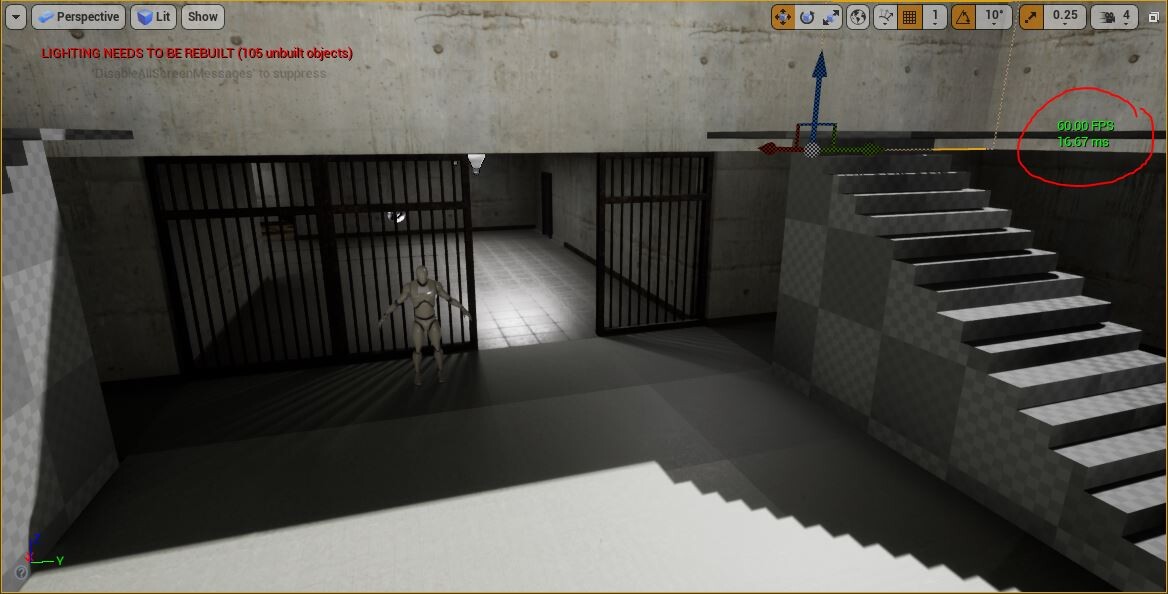
Then there are more stats that we can pull out onto the screen to have a more detailed look into what parts of the project are having the most trouble.

To be able to interpret this details we must know that: Stats = issue
GAME = Blueprints
DRAW= CPU
GPU = GPU
When we know this we must analyse this using the next reference: Problem ---------> relation
GPU -------- >Poly count
CPU ----------> Draw calls
MVRam--------> Textures
Dynamic effects such as movable lights, particles or animations are also related to GPU performance.
Note: If frame and draw values are very similar in the stats, probably the problem to tackle would be in the CPU, reduce number of objects in scene or DRAW Calls.
3. Optimization techniques (brief summary)
1. LODs system
LODs defines as Level of detail. Depending on the distance we visualize the object inside the scene, this will reduce dynamicaly its detail soy when its very far away it would have much les geometry detail so that the system can process it better. Unreal gives many tools in order ti handle LODs inside the editor.

2. Merge Actors
windows / developer tools / merge actors
To reduce number of objects inside a level, UE4 gives tools in order to merge objects and reduce SM count. There are three types of merging techniques.

Option 1 : Merge actors separating ID by materials
Pro: Keeps details for materials Con: Wont optimize very much as it still has the draw calls from the materials
Option 2 : Merge actors and bakes all materials into one single texture and material
Pro: Reduce draw calls Con: Can lose a lot of detail by making much smaller textures.
Option 3 : Merge actors and makes a copy as an instance. Groups my materials ID
Pro: Keeps materials detail Con: Instances are a bit more difficult to handle in terms of positioning in the world
3. Texture Optimization
Textures must always go into the editor with standard values ( 512, 1024,2048....etc) if not they would give visual issues. The only exceptions are sprites and hdri.
Textures and be optimized with the options:
Maximum texture size - Define how big the texture must be independently of its original size
LOD Bias - similar to a SM system. It creates different levels of detail or resolution for textures depending on its screen size.

4. Lighting
Lighting doesn't have as much optimization techniques as it has more functionality definitions. Basically dynamic lights will always be more performance expensive than everything that's is baked. That's why we have to take into consideration how our illumination must be handles in a scene using the different types of light techniques.
New master course UNREAL ENGINE BLUEPRINTS ( Week 2 : PHOTOGRAMMETRY )
General / 29 September 2021
So this week we hade some experimentation with photgrammetry. Knowing how to do retopology now, it was a good thing to know in order to get models with a different technique. I had a lot of fun doing it, I never done photogrammetry before and I wasn´t sure how it worked so this was a very cool process. The software used was Agisfot Metashape. It is a very intuitive and esay to use software. I had some experience with meshroom before but I never got very good results so Im glad I had some learning time to understand full on the technique of photogrammetry and its full potential
After scanning the models we also did some process of retopology and baking to be able to usea the models in softwares like Unreal engine. I added a little render I did with all the models we scanned becuase I found it hilarious.


download stich teddy bear model here:
https://sketchfab.com/3d-models/stich-teddy-ffc61a4556674fd0bd858f58eef14bff

New Master course UNREAL ENGINE BLUPRINTS! ( Week 01 : RETOPOLOGY)
General / 23 September 2021
Im going to start a new series of classes for my self to learn all about preparing interactivity in blueprint! Im very excited and I would love to share my process and learning project in here.
For the first week we started with simple retopology in Zbrsuh as we would start working with photogametry objects to learn how to treat them to import them inside UE4. I leave here a little render of the model we did. Rendered in Eevee. We worked with very little tools like zremesher and baking in zbrush.


SPANISH BLOG____ASUS, NVIDIA and SANDISK Interview. SpeedModeling contest prize
News / 14 July 2021
Participe en el concurso de Lightbox academy con el patrocinio de Nvidia y Asus. Gracias a su evento conseguí hacerme con un Asus Studio Book y una Nvida quadro 3000.
Me hicieron una pequeña entrevista donde hablo sobre el concurso y mi opinión acerca de las nuevas tecnologías en relacion a los artistas digitales.
en el link teneis la entrevista!
espero que os guste!

The Spanish Princess Making off ( ARTWAR 5 Contest)
Making Of / 30 June 2021
This is a post created for the website https://cubebrush.co/
link to the blog post:
https://cubebrush.co/blog/the-spanish-princess
The contest was Artwar 5. Please if you read it I would really apreciate it if I can get any feedback or advice related to the development of this project.
Thanks a lot and stay safe
NVIDIA + LIGHTBOX Speed Modeling contest
General / 29 June 2021
I had the honor of participating and recieving the first price in the speed modeling contest done by lightbox in colaboration with Nvidia and Skydance animation.
The contes was modeling a prop in 3 hours. The theme was pirates
Here is the video of the event.
language is in Spanish
https://www.youtube.com/watch?v=XUVrePcVWac

My entry


